FBR e-invoicing integration is the technical step that connects your invoicing software, ERP or point-of-sale system to the computerised system of the Federal Board of Revenue (FBR), so that each sales tax invoice is validated and receives a unique FBR invoice number in real time. You cannot complete it alone: the connection must be made through an FBR-licensed integrator, and it must be tested before live invoicing begins.
Our complete guide to FBR digital invoicing in Pakistan explains the legal background, the 72-hour correction rule and the penalty framework. This companion article is deliberately practical. It covers who must integrate, what to prepare, the available routes, sandbox testing, go-live, common errors and the consequences of delay. It is written for business owners, finance managers and IT teams in Pakistan, including those in Karachi and Sialkot.
In practice, FBR e-invoicing integration means that your system behaves as an integrated person. Under Chapter XIV of the Sales Tax Rules, 2006, as substituted by SRO 69(I)/2025, an integrated person issues each invoice in the prescribed format, transmits the data to the Board’s computerised system through secure means and receives a unique FBR invoice number. A QR code based on that number is then printed on the invoice.
Technically, your software sends invoice data to the FBR Digital Invoicing API. The technical documentation published through FBR (version 1.12 at the time of writing) describes two real-time requests: one validates invoice data and the other posts it. Each request carries a security token. Your integrator and software vendor should always work from the latest version of that document.
FBR e-invoicing integration involves two choices that are often confused. The first is which licensed integrator will connect you to the FBR. The second is which software will generate your invoices and call the API. According to the FBR Digital Invoicing FAQs, a registered person may use any commercial e-invoicing software, provided it is integrated through a licensed integrator that holds a valid FBR licence.
The duty to complete FBR e-invoicing integration applies to sales tax registered persons under the notified timetable. SRO 1852(I)/2025 is the operative schedule, and it depends on turnover in the last twelve months’ sales tax returns. The table shows when electronic invoicing was due to start. Registration and testing deadlines fell earlier in every category.
| Category | Electronic invoices from |
|---|---|
| Public companies (no turnover threshold) | 1 November 2025 |
| Other companies with turnover above Rs 1 billion | 1 November 2025 |
| Importers (no turnover threshold) | 1 November 2025 |
| Individuals and associations of persons with turnover above Rs 100 million | 1 November 2025 |
| Other companies with turnover above Rs 100 million up to Rs 1 billion | 15 November 2025 |
| Other companies with turnover up to Rs 100 million | 1 December 2025 |
| All other registered persons | 31 December 2025 |
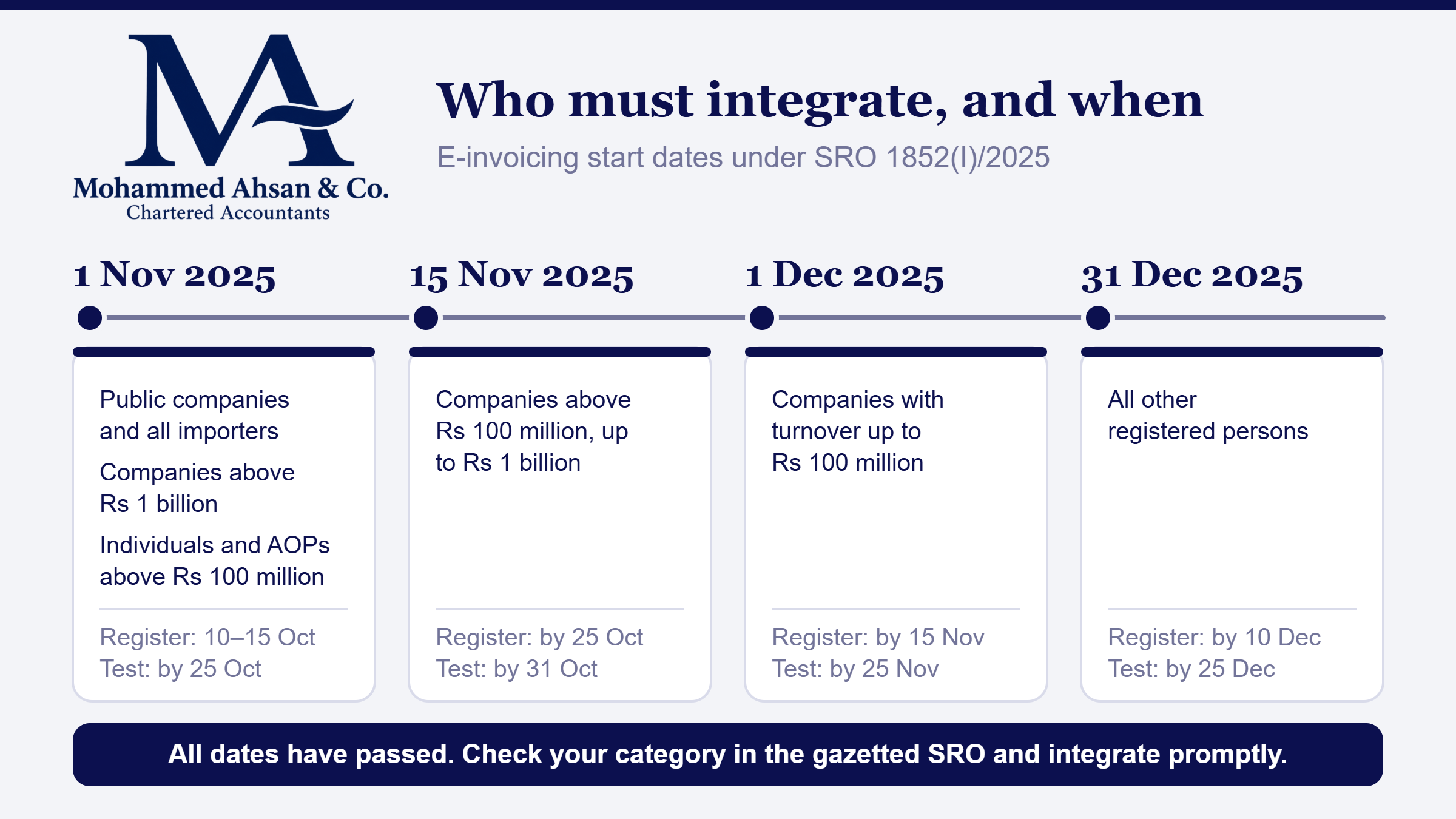
Every date has now passed. One caution: FBR’s own FAQ page still quotes the earlier SRO 709 dates of 1 June and 1 July 2025. Those dates were superseded, so rely on the gazetted notification for your category rather than on that page.
[INSERT IMAGE 2 — E-INVOICING TIMELINE BY CATEGORY GRAPHIC HERE]
The federal framework sits under the Sales Tax Act, 1990, which mainly covers goods. Sales tax on most services is administered by provincial authorities under their own laws. Newer instruments have widened the scope.
SRO 1666(I)/2026 and SRO 1667(I)/2026 of 29 September 2026 are reported to extend the Chapter XIV framework to federal excise duty and Islamabad services tax. Sales Tax General Order 36 of 2026, issued on 13 November 2026, is reported to set a procedure for 13 oil and gas exploration companies from the December 2026 returns. If your activity may be affected, read the notification itself.
Most delays in FBR e-invoicing integration come from missing data rather than from the connection itself. Prepare the following before you open the Digital Invoicing section of the IRIS portal.
| What you need | Why it matters |
|---|---|
| Active sales tax registration and a working IRIS login | The Digital Invoicing section is reached through IRIS. |
| A technical contact (name, mobile number and email) | Requested when you submit your technical details. |
| ERP or invoicing system provider, software type (cloud or on-premises) and version | Requested in IRIS and used to support your set-up. |
| Business nature and one sector | They decide which sandbox scenarios you must pass. |
| Hosting company, country and one to three public IP addresses | Needed for whitelisting if you integrate through PRAL. |
| Clean master data: HS codes, units of measure, sale types and tax rates | Invoices are validated against FBR reference data, and mismatches are rejected. |
| Buyer details: NTN or CNIC, registration status and province | Mandatory invoice fields. The buyer NTN or CNIC is required unless the buyer is unregistered. |
According to the technical documentation, each invoice header carries the invoice type, date, seller and buyer details and the buyer’s registration type. Each line needs an HS code, product description, rate, unit of measure, quantity, values, sale type and the applicable sales tax figures. The exact list is updated from time to time, so check the current version.
FBR’s list of licensed integrators currently shows eight names that can carry out FBR e-invoicing integration for you: Haball (Pvt) Ltd, WebDNAWorks (Private) Limited, EY Ford Rhodes, PRAL, Openport Pakistan (Pvt.) Limited, TMR Consulting (Private) Limited, Naturetech (Private) Limited and Dynamic Resources (Private) Limited. The page shows no update date, so check it again before you choose.
| Route | Cost | Practical points |
|---|---|---|
| PRAL | Free of cost integration services on demand under rule 150XF | PRAL whitelists your server IPs, and its manual says it accepts or rejects them within about two working hours. Sandbox testing is included. |
| Private licensed integrator | May charge for configuring and integrating your software, within a limit set by Board general order | You select the integrator in IRIS, and it must accept your application. Agree fees, scope and support in writing. |
| More than one integrator | Depends on each integrator | Allowed by Sales Tax General Order 01 of 2026 where required, for example if an ERP and a separate POS both issue invoices. |
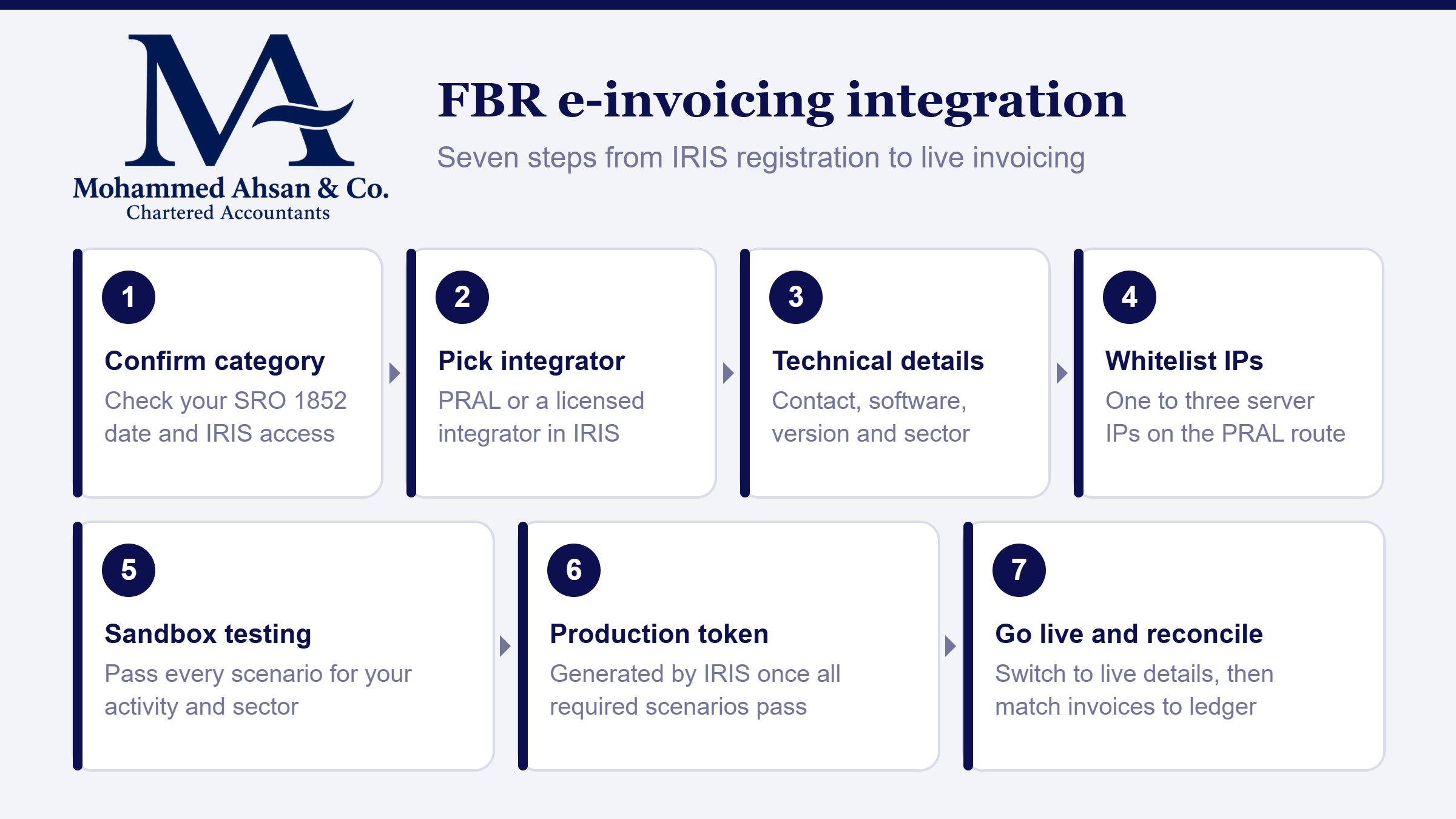
The sequence below follows PRAL’s user manual and the FBR technical documentation. Screen names in IRIS can change, so treat them as a guide.
[INSERT IMAGE 3 — FBR E-INVOICING INTEGRATION STEPS INFOGRAPHIC HERE]
Testing is mandatory for FBR e-invoicing integration. PRAL’s manual states that you must submit test invoices for each scenario matching your business nature and sector before you receive production access. The sandbox uses dummy data and is separate from live reporting.
The technical documentation lists 28 scenarios, SN001 to SN028, mapped to business activity and sector. Scenarios SN026 to SN028 apply only to persons registered as retailers. A failed test invoice returns error details, which you correct and resubmit. The same document states that a security token is valid for five years, so diarise the expiry date.
Rejected invoices during FBR e-invoicing integration return numbered error codes. The codes below are drawn from the technical documentation and may change when it is updated.
| Error | Likely cause | Fix |
|---|---|---|
| 0052: HS code does not match the sale type | Wrong HS code, sale type or scenario | Check the code against FBR’s reference data for that sale type |
| 0046: rate missing | No tax rate sent for the item | Send the applicable rate for every line |
| 0002 or 0106: invalid buyer number or buyer not registered | Wrong NTN or CNIC, or wrong buyer registration type | Verify the buyer and set the registration type correctly |
| 0005 or 0113: date error | Wrong date format | Use the YYYY-MM-DD format |
| 0088: invoice number format | Special characters in the invoice number | Use letters, numbers and hyphens only |
| 0058: self-invoicing not allowed | Seller and buyer details are the same | Correct the buyer record |
| 0401 or 0402: token unauthorised or missing | Wrong token, or sandbox and production details mixed up | Check the token and the environment being called |
Not every problem produces an error code. FBR’s FAQs also warn that items sharing an HS code but carrying different sale types, such as standard-rate and Third Schedule goods, must be listed separately with distinct descriptions. Combining them can produce incorrect tax treatment even when the invoice is accepted. Parallel manual invoicing during a system fault can also cause mismatches.
Because the notified dates have passed, a business that has not completed FBR e-invoicing integration is already exposed. The provisions below are summarised from FBR sources and professional summaries of the Finance Act 2026, generally in force from 1 July 2026. Confirm the figures against the Act before acting on a notice.
| Provision | Consequence |
|---|---|
| Section 33, S. No. 25 (as substituted by the Finance Act 2026) | Penalty of up to Rs 1 million for failing to integrate within the time notified by the Board, up to Rs 5 million if the default continues one month later, and possible sealing of premises |
| Section 33, S. No. 25A | Reported as Rs 500,000 for a first default, rising to Rs 3 million for repeated defaults |
| Section 21(2) | Non-compliance with section 23(5) and (6) is now a ground for suspension of registration |
| Section 8B(1) proviso | The Board may reduce or enhance the adjustable input tax limit of a registered person according to compliance with monitoring and e-invoicing systems |
Business Recorder reported on 25 September 2026 that the FBR had begun suspending the registrations of non-integrated taxpayers. The same report notes that the law requires a show-cause notice and an opportunity of being heard. Suspension can also disrupt your customers’ input tax claims, so a notice should be answered promptly and with documents.
FBR’s FAQs state that a digital invoice is required for all sales reported in Annexure-C of the sales tax return, including exports. After FBR e-invoicing integration, reconciliation is therefore a monthly task, not an annual one. Match your ERP sales register, the invoices accepted by the FBR system and your ledger before you file the sales tax return on IRIS.
Consider a hypothetical distributor whose ERP records 400 sales in a month, while the FBR system holds 388 accepted invoices because 12 were rejected for HS code and sale type mismatches and never resubmitted. The gap will surface at reconciliation and must be explained. A daily rejected-invoice report prevents that situation.
Mohammed Ahsan & Co. is not on FBR’s list of licensed integrators, so the technical connection is made through PRAL or another licensed integrator. Our role is to make sure your business is ready for FBR e-invoicing integration and stays compliant afterwards.
Karachi importers and distributors usually issue high invoice volumes through several systems, so integrator choice and data quality matter. Sialkot manufacturers and exporters often mix local and export sales, which makes sale types and HS codes especially sensitive. Where recurring rejections point to weak controls, an internal audit review can address the cause. You can also read more about Mohammed Ahsan & Co.
It is the process of connecting your POS, ERP or invoicing software to the FBR’s computerised system through a licensed integrator, so that each sales tax invoice is validated and receives an FBR invoice number in real time.
For FBR e-invoicing integration, PRAL acts as a licensed integrator under rule 150XF and provides integration services free of cost on demand. You still bear the cost of your own software, hardware and any developer time.
Usually yes. FBR e-invoicing integration does not require a particular brand of software, and FBR’s FAQs allow any commercial e-invoicing software integrated through a licensed integrator. Your software must be able to send structured invoice data in the prescribed format and pass the sandbox scenarios.
PRAL’s manual makes scenario testing a condition of production access. It proves that your system can produce valid invoices for your business activity and sector before any live invoice is reported.
We have not found an official standard timeline. The only timeframe in PRAL’s manual is up to two working hours for IP whitelisting. The remainder depends on your software, data quality and how quickly the sandbox scenarios pass.
Yes, where required. Sales Tax General Order 01 of 2026 allows a registered person to engage one or more licensed integrators, which helps where different systems issue invoices.
FBR’s FAQs state that transport problems or internet outages at the taxpayer or the integrator do not excuse non-compliance. Prepare a written outage procedure in advance.
The notified dates have passed, but completing FBR e-invoicing integration promptly is still the best course. Penalties and suspension risk arise from continued non-compliance, so start the process immediately and seek advice if you have already received a notice.
FBR e-invoicing integration is manageable when it is treated as a short project: confirm your category, choose an integrator, prepare clean data, pass every sandbox scenario and reconcile from the first week of live invoicing. The main risks are weak master data, untested scenarios and late action after the notified dates.
If you would like a readiness review or help with reconciliation and notices, you can contact Mohammed Ahsan & Co., call or WhatsApp +92 346 8900089, or email ahsan@mahsanco.com.
A direct conversation, not a sales pitch.